Trello is one of the most popular tools for organizing work visually. It is simple, flexible, and easy to understand: create a board, add lists, create cards, and move those cards as work progresses. For many teams, that is enough. But not every workflow is just a board.
Some work involves client conversations, files, approvals, checklists, calendar events, decisions, follow-ups, and context spread across different tools. In those cases, a board can help you track the work, but it may not be enough to actually run the work.
That is where Opeego is different. Trello helps you track tasks. Opeego helps you run the whole workflow.
Quick Comparison
| Category | Trello | Opeego |
|---|---|---|
| Core model | Boards, lists, and cards | Sessions |
| Best for | Visual task tracking | Full workflow collaboration |
| Main strength | Simplicity | Keeping context together |
| Communication | Comments on cards | Messages inside the Session |
| Files | Attached to cards or linked externally | Stored with the Session context |
| Approvals | Usually handled manually | Part of the collaboration flow |
| Client collaboration | Possible, but board-based | Designed around shared Sessions |
| Guided workflows | Templates and automation | Smart Sessions |
| Best use case | Internal task tracking | Client-facing or process-heavy work |
| Main limitation | Context can become scattered | Requires users to understand the Session model |
Ready to keep your whole workflow in one place?
Try Opeego FreeThe Core Difference
The main difference between Trello and Opeego is not a feature. It is the way each product thinks about work.
Trello is built around boards, lists, and cards. Opeego is built around Sessions.
A Trello board is great when you need a visual way to organize tasks. You can create columns like To Do, In Progress, Waiting, and Done — then move cards across the board as work moves forward.
Opeego uses a different model. Instead of starting with a board, Opeego starts with a Session. A Session is a shared workspace for a specific project, process, client, or workflow. Inside that Session, you can keep messages, tasks, files, checklists, calendar events, media, approvals, and next steps together.
Trello is centered around cards. Opeego is centered around the full collaboration.
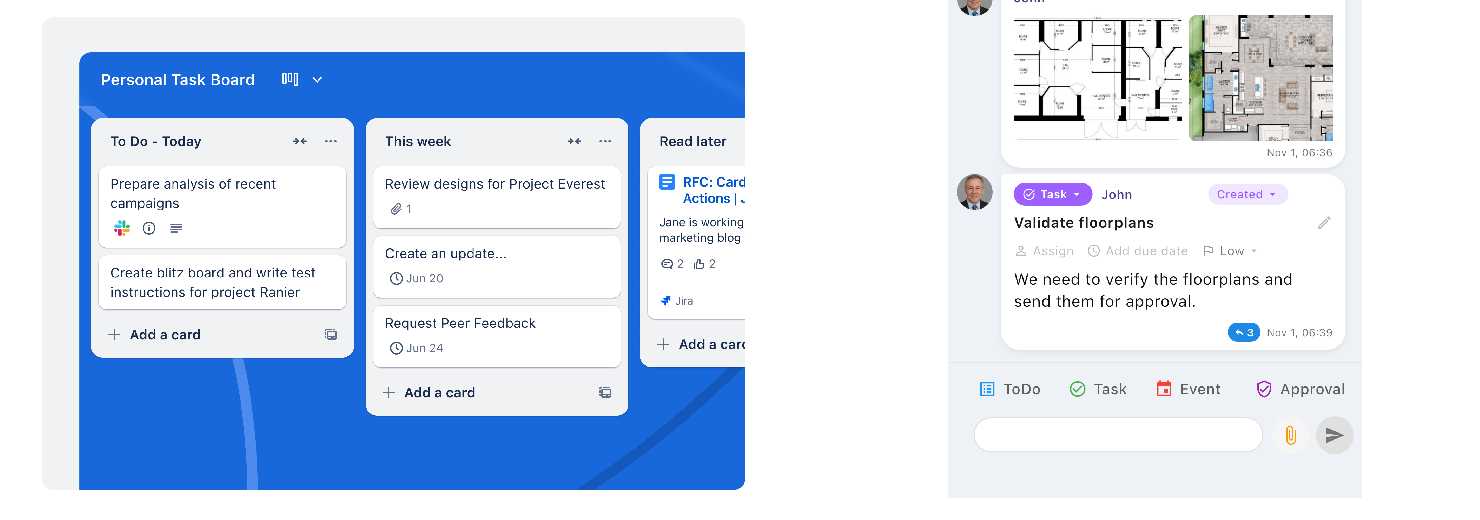
Trello Is Great for Visual Task Tracking
Trello works well when the work is already clear. For example, if your team needs to track internal tasks, Trello can be a very good fit. You create a card for each task, assign people, add due dates, add checklists, and move the card from one stage to another.
This is useful for:
- Internal project tracking
- Simple Kanban workflows
- Content calendars
- Personal productivity
- Lightweight team planning
Trello's biggest strength is that it is easy to understand. Most people can open a Trello board and understand what is happening without much explanation. That simplicity is valuable. If all you need is a simple task board, Trello may be enough.
But Some Work Needs More Than a Board
The problem starts when the work is not only about tasks. Many real workflows are messier than that. A client project, for example, may include:
- Initial messages and requirements
- Uploaded files and notes
- Tasks, feedback, and approvals
- Calendar events and follow-ups
- Final deliverables and decisions made along the way
A Trello card can hold some of that information, but the more context you add, the more the card becomes a container for everything. At some point, the board is no longer just a board. It becomes a workaround.
You may end up using Trello for tasks, email for communication, Dropbox or Google Drive for files, a calendar for meetings, WhatsApp for quick client messages, and separate tools for approvals. The work is technically being managed, but the context is scattered.
Opeego is designed for that problem.
Opeego Keeps the Workflow Together
Opeego is built around Sessions because many workflows need one shared place where the full context lives. A Session can include messages, tasks, checklists, files, media, calendar events, approvals, mentions, shared links, sections, search, and exports.
Instead of forcing everything into a card, Opeego gives the whole workflow its own space. That means a client, team member, or collaborator can enter one Session and understand:
- What has been discussed
- What files were shared
- What tasks are pending
- What needs approval
- What happened before and what needs to happen next
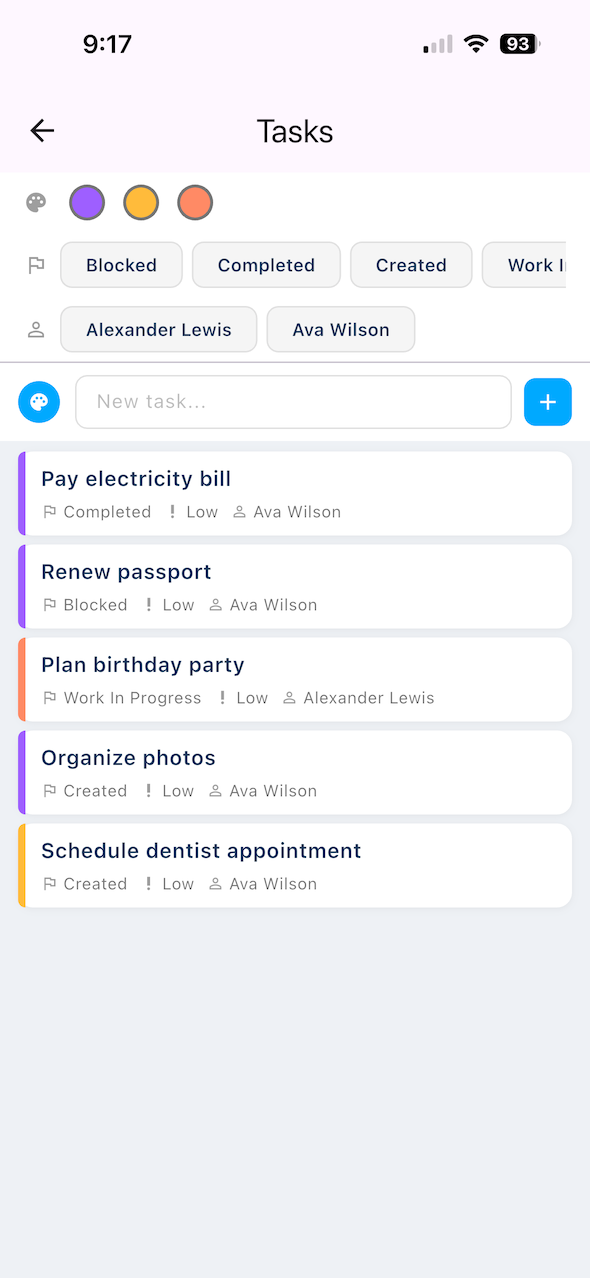
Client-Facing Work Is Different
Many project management tools work well for internal teams but become harder to use with clients. Clients usually do not want to learn your project management system. They do not want to understand labels, filters, automations, board structures, or internal naming conventions.
They usually want simple answers: What do you need from me? Where do I upload this? What should I review? What happens next?
Instead of inviting a client into a board and expecting them to understand how your team works, Opeego gives them a shared Session for the specific process. The client does not need to understand a full project management system. They just need to follow the Session.
For example:
- A designer can create a Session for a logo project
- An accountant can create a Session to collect tax documents
- A consultant can create a Session for onboarding a new client
- A contractor can create a Session to manage decisions and approvals
Smart Sessions: A Different Kind of Workflow
One of the biggest differences between Trello and Opeego is the idea of Smart Sessions — preconfigured workflows that help guide a person through a process. Instead of giving someone an empty board, Opeego can give them a structured starting point.
For example: "Prepare your documents for your accountant," "Create a logo design brief," "Review and approve design files," or "Organize a client onboarding process."
This matters because many people do not want to design a workflow from scratch. Trello is flexible, but that flexibility often means the user has to figure out the structure. Opeego can make the workflow more guided from the beginning.
When Trello Is the Better Choice
Trello is still a strong product, and there are many cases where it is the better choice:
- You mainly need a simple Kanban board
- The workflow is internal and the process is already clear
- You do not need much client collaboration
- Files and approvals are not central to the work
- Your team already uses Trello successfully
If your workflow is mostly about moving tasks from one column to another, Trello may be enough. Opeego is not trying to replace every Trello board. The point is that some workflows need more than task tracking.
When Opeego Is the Better Choice
Opeego is a better fit when the workflow includes more context:
- You work with clients or external collaborators
- The process includes files, feedback, and approvals
- Important context is currently spread across email, chat, folders, and task tools
- You need to guide someone through a process
- You repeat the same workflow often
- You want tasks, files, messages, events, and approvals in one place
Opeego is built for workflows where collaboration is the work.
Example: A Logo Design Project
In Trello, you might create cards like: Collect client information, Create first concepts, Send logo options, Wait for feedback, Revise selected concept, Send final files. That can work.
But the actual project also includes the client's original request, brand references, uploaded files, design preferences, messages, feedback, approval of a selected direction, final file delivery, and follow-up questions. If this information is spread across Trello, email, Dropbox, and chat, the designer has to keep connecting the pieces manually.
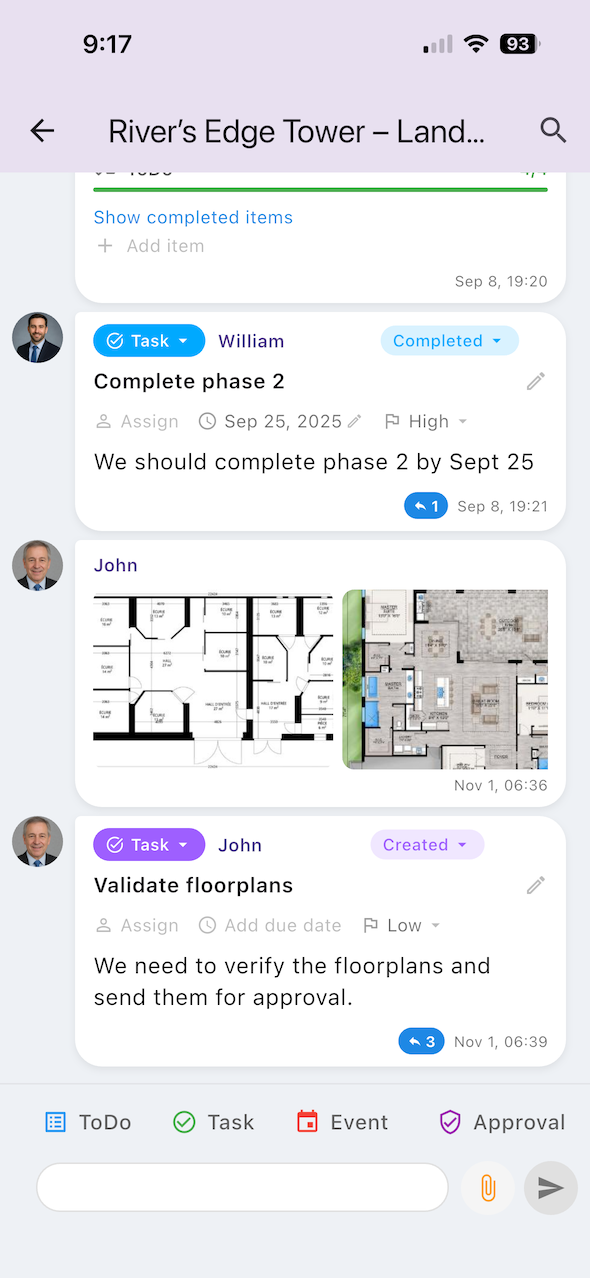
In Opeego, the entire logo design project can live inside one Session. The tasks are still there, but they are not isolated from the conversation, files, approvals, and deliverables. That is the difference.
Example: Collecting Documents for an Accountant
In Trello, you could create a board with cards for each missing document. That may work for the accountant internally. But for the client, it may feel like too much. The client does not want to manage a board. They want to know what documents are needed, upload them, answer questions, and see what is still missing.
In Opeego, this becomes a guided Session. The accountant can request information, collect files, ask follow-up questions, add tasks, and keep everything in one place. The client gets a clearer experience. The accountant gets better organization.
The Bottom Line
Trello is a good tool for organizing tasks visually. Opeego is for workflows that need more than a board.
If your work is mostly internal task tracking, Trello may be the right choice. But if your work includes clients, files, conversations, approvals, events, checklists, and repeated follow-up, a board may not be enough.
Trello helps you see the work. Opeego helps you move the work forward.
Ready to manage more than tasks?
Create your first Opeego Session and keep your messages, files, approvals, checklists, events, and tasks together in one place.