Most service professionals managing client projects are already using WhatsApp for work. It is fast, familiar, and your clients are already on it — no sign-up, no convincing required. That is a genuine advantage, and it would be dishonest to pretend otherwise.
But there is a point in most client projects where a chat stops being enough. Files get buried, requests disappear into the scroll, and there is no way to tell what is done and what is not. That is where Opeego comes in — and the difference between the two tools is more useful to understand than most comparisons let on.
At a glance
| Category | WhatsApp / WhatsApp Business | Opeego |
|---|---|---|
| Core model | Personal and group chats | Sessions (organized workspaces) |
| User base | Massive — most clients already have it | Smaller — clients need to sign up |
| Communication | Messages, voice messages, voice/video calls | Messages, voice messages |
| Task management | None | Tasks with status, priority, assignee, due date, Kanban board |
| File organization | Attached to the chat, hard to find later | Organized in folders per Session |
| Approvals | Not supported | Built-in approval workflow |
| Calendar events | Not supported | Built-in calendar with month/week/day views |
| Business features | Business profile, quick replies, labels (WA Business only) | Smart Sessions, roles, teams |
| Project organization | None — everything is a chat | Each project has its own Session |
| Main limitation | Work gets lost in the scroll | Clients need to create an account |
Tired of losing project context in your chats?
Try Opeego FreeLet's start with the obvious
WhatsApp's biggest strength is that everyone is already on it. No friction, no onboarding — you send a message and your client replies from the same app they use to talk to their family. For short, simple interactions that do not need a paper trail, it is genuinely hard to beat.
WhatsApp Business adds a bit on top: a business profile, away messages, quick replies, and simple labels on conversations. For a florist confirming orders or a photographer checking in before a shoot, that is probably enough.
WhatsApp Business makes your chat look more professional. It does not make your projects more organized.
When the chat starts to get messy
Projects that run longer than a few days tend to hit the same wall. A client sends a voice message with feedback, then later a PDF, then a few photos, then asks about something they mentioned three weeks ago. By the time you need to find any of it, it is buried under dozens of other messages with no way to separate the important stuff from the noise.
Tasks are the other casualty. When a client casually says "can you also fix that section?" in a voice message, that request has nowhere to live. You either write it down somewhere else or you forget it. WhatsApp has no concept of a task, a status, or a follow-up — so the mental load of tracking open work falls entirely on you.
And then there are approvals. Getting a thumbs-up emoji for a design is fine until the client says they never approved it. There is no record of what version was shared, when, or what was actually agreed.

That is where Opeego is different
Opeego is built around the same thing as WhatsApp — conversation — but each project gets its own Session: a dedicated workspace where the chat, files, tasks, approvals, and calendar all live together.
Instead of a single overflowing thread, you have structure that actually holds up as the project grows:
- Tasks with real tracking. Assign them, set priorities, give them due dates, and watch them move through a Kanban board. When a status changes, a note appears in the chat automatically.
- Files in folders, not in the scroll. Everything uploaded to a Session lives in an organized file browser. There is a separate media gallery for photos too.
- Voice messages, messages, and mentions. The conversation itself works like you are used to — including voice messages — but with @mentions to pull the right person's attention and reactions to keep things moving.
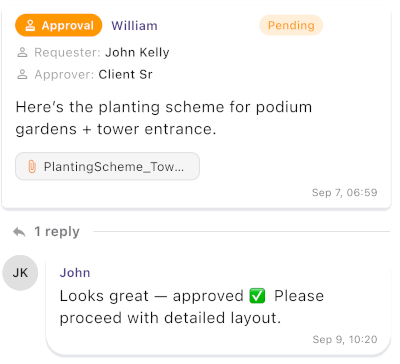
- Formal approvals. Instead of a thumbs-up in a chat, you send an approval request. The client accepts or rejects it, and the decision is logged.
- A built-in calendar. Deadlines, meetings, and milestones are all visible without leaving the Session.
- Smart Sessions for repeating work. Run the same type of project often? A Smart Session gives you a ready-made structure so you are not starting from scratch every time.
One honest thing to say about switching
Opeego requires clients to sign up. Some will push back — they are used to WhatsApp and a new tool feels like extra work. That friction is real and worth acknowledging.
In practice, many clients find Opeego easier once they are in it. Instead of digging through a chat for a file or trying to remember what was approved, they just open the Session and it is all there. But it is still a change, and not every client will embrace it.
A good middle ground for some professionals: use WhatsApp for the first contact and early conversation, then move the project into an Opeego Session once the scope is clear and there is real work to track.
A travel agent's itinerary, two ways
A client messages about a two-week trip to Japan. On WhatsApp, the conversation grows: destination preferences, budget, a draft PDF, voice note feedback, hotel questions, flight changes, more questions six months later. By the end, finding any specific detail means scrolling through hundreds of messages.
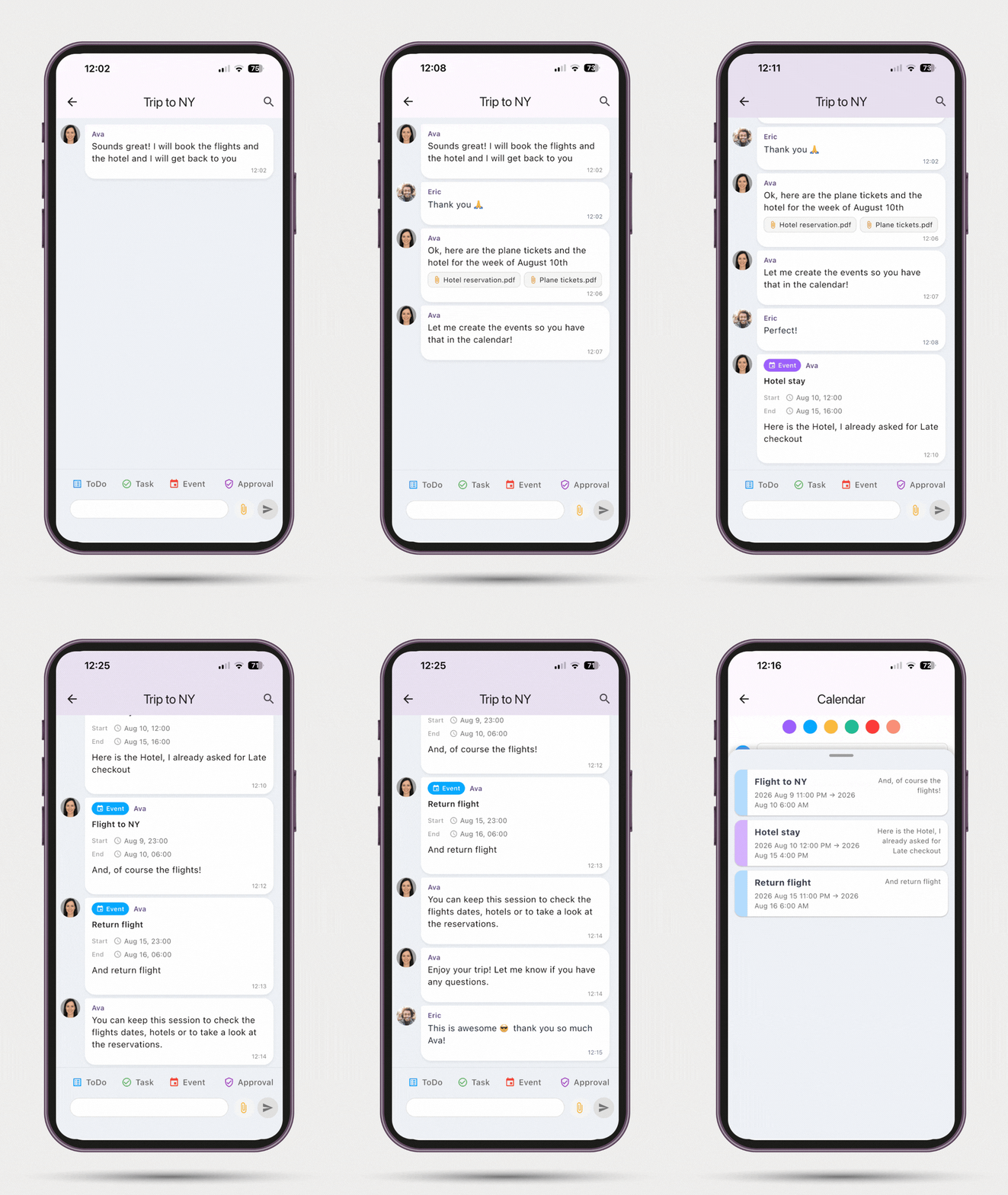
In Opeego, the travel agent creates a Session for the trip. Itinerary drafts live in the files tab. The client's preferences are a checklist. Confirmed bookings are tasks. The final itinerary approval is on record. When the client calls six months later, everything is still there and easy to find.
WhatsApp is where your clients already are. For quick exchanges and first contact, it earns its place. But when a project grows beyond a few messages, the scroll stops being a workspace — and that is exactly the gap Opeego is built to fill.
Keep your conversations and your projects in the same organized place.
Try Opeego Free